
Wireface Desktop
Agents and permissions
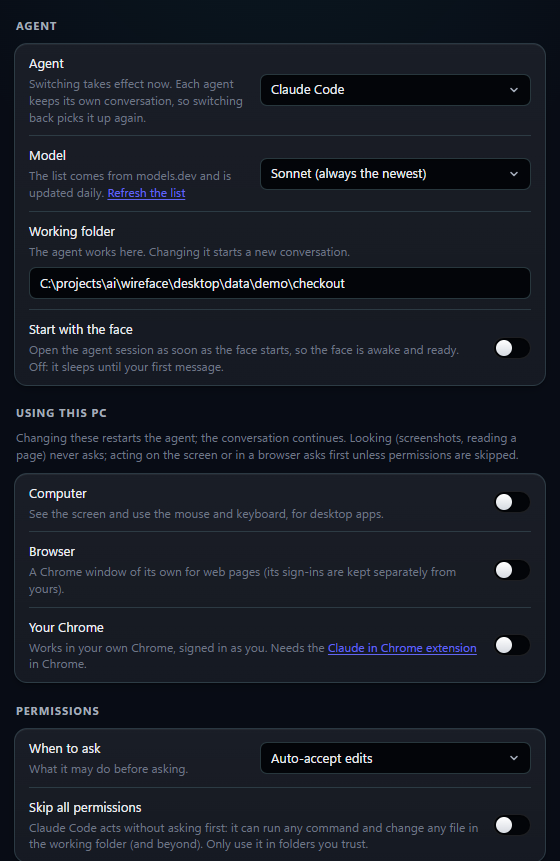
Wireface drives the agent you already use. Choose which one, its model and the folder it works in, decide when it asks before acting, and let Claude Code use your PC. All of it is on the panel's Agent tab.
On this page
Choosing the agent
Pick Agent on the Agent tab: Claude Code, OpenCode or Codex. Switching takes effect at once. Each agent keeps
its own conversation for each face, so switching back picks it up again. In profile.json it's
backend.type: claude, opencode or codex.
| Claude Code | OpenCode | Codex | |
|---|---|---|---|
| Connects through | Claude Agent SDK | opencode acp | codex exec --json |
| Runs as | One long session | One long session | One run per message, resumed |
| Asks you first | Yes: Allow, Always, Deny | Yes: Allow, Always, Deny | No: its permission mode decides |
| Wireface's computer use | Yes (below) | No | No |
Each one must be installed and signed in already: see Connect your agent.
Your setup comes along
The agent runs exactly as you've set it up: your sign-in, model, skills, MCP servers and permission rules.
- Claude Code brings its settings, MCP servers, skills, plugins and
CLAUDE.md. Wireface also gives it two face tools:mcp__face__expressto show a feeling, andmcp__face__show_faceto send the face away or bring it back when you ask. - OpenCode brings its config, MCP servers and
AGENTS.md, and any provider and model it supports. - Codex brings its
config.toml, MCP servers andAGENTS.md.
The skills and MCP servers you've connected are what the face can do: a calendar server lets it read your calendar, a tracker's lets it open tickets. The panel's Tools tab lists them, turns each on or off in the agent's own configuration, and installs recommended ones: see MCP servers and skills.
Models
Model offers a list for each agent from models.dev, the catalogue OpenCode
itself uses, with Claude Code's opus, sonnet and haiku aliases first.
Default leaves the choice to the agent, and Other... takes any name: a Claude model id, OpenCode's
provider/model, or a Codex model name. In profile.json it's backend.model
(null for the agent's own default).
The lists are downloaded at most once a day, into data\cache. Refresh the list, under the
setting, downloads them again now. From a clone, RefreshModels.cmd does the same for every list,
including the realtime voice's.
The working folder
Working folder is where the agent runs. Use Choose... to pick one. Until you do, it's
data\sandbox, made when Wireface starts. Each folder has its own conversation: changing the folder
starts a new one, and the last one is picked up again after a restart. New conversation in the face's menu
starts afresh in the same folder.
AGENTS.md
Replies are read aloud, so OpenCode and Codex are told to write short spoken sentences. When the face starts one of
them in a folder without an AGENTS.md, it creates one with that instruction. An existing
AGENTS.md is never touched or added to: in such a folder the agent writes as it normally does, and the
face strips the markdown before speaking. Edit or delete the file freely. Claude Code is given the same instruction
directly, and needs no file.
Permissions
By default Claude Code and OpenCode ask before they run a command or change a file. The face asks out loud and the panel shows Allow, Always allow and Deny; with the microphone on, "yes" or "no" answers it. "Always" lasts for the session. Codex can't be asked while it works this way, so its mode decides up front what it may do.
Choose with When to ask (backend.permission_mode):
| Agent | In the panel | permission_mode | What it means |
|---|---|---|---|
| Claude Code | Ask before changes | default | Asks before it runs a command or changes a file |
| Auto-accept edits | acceptEdits | Accepts file edits without asking | |
| Plan only | plan | Plans without making changes | |
| OpenCode | Ask before changes | default | Asks before it edits files or runs commands |
| Use OpenCode's own settings | own | Whatever your OpenCode config says | |
| Codex | Edit the working folder | default | Edits files and runs commands in the working folder |
| Read only | read-only | Only looks |
Switching to another agent puts the mode back to default if the new agent doesn't have the old one.
Skipping permissions
Skip all permissions (backend.skip_permissions) removes the questions. The agent can then run any
command and change any file, in the working folder and beyond. Use it only in folders you trust.
- Claude Code starts with
--dangerously-skip-permissions. - OpenCode's requests are approved automatically by the face.
- Codex runs with
--dangerously-bypass-approvals-and-sandbox, without its sandbox.
Turning it on asks you to confirm, and restarts the agent's process (the conversation continues). While it's on, the face wears a red rim, the panel shows a red Permissions skipped badge, and the face's right-click menu offers Stop skipping permissions.
Even with permissions skipped, every text and call your agent makes on the phone line is put to you first.
Start with the face
On by default (backend.auto_start): the agent session opens as soon as the face starts, so the face is
awake and ready. Off: it sleeps until your first message.
Using this PC
Claude Code behind the face can see and use your PC. The switches are on the Agent tab under Using this PC,
shown while the agent is Claude Code, and all three are on by default (backend.tools). Changing them
restarts the agent; the conversation continues.
- Computer: screenshots of the screen, and the mouse and keyboard (click, drag, scroll, type, key presses), for desktop apps. Claude Code's own computer use is macOS-only, so the face provides it. Screenshots are scaled to 1366 pixels wide, and every action returns a fresh one.
- Browser: a Chrome window of its own, driven by Playwright's MCP server. It uses your installed Chrome, with
a profile of the face's own, so its sign-ins are kept but separate from yours. It's started with
npx, so it needs Node.js as well as Chrome. - Your Chrome: Claude in Chrome works in your own Chrome, signed in as you. It needs the Claude in Chrome extension in Chrome, and Claude Code signed in with your claude.ai account.
Looking (screenshots, reading a page) never asks. Clicking, typing and browsing ask first like any other action, unless permissions are skipped. The face and the panel are on the screen too, kept on top, and the agent is told to leave them alone. Screenshots and page contents go to Claude like everything else the agent reads.
The agent's executable and arguments
Two settings in backend.options, in the face's profile.json:
cli_path: the agent's executable, if Wireface can't find it. It looks onPATHfirst, and finds the real.exeinside an npm install by itself.cli_args: a list of command line arguments for OpenCode and Codex. For OpenCode it replaces the default,["acp"]; for Codex it's added to the command line.
{
  "backend": {
    "type": "opencode",
    "options": { "cli_path": "C:\\tools\\opencode\\opencode.exe" }
  }
}