
Wireface Desktop
Phone line
Give a face a Twilio number. A restricted receptionist answers its calls and texts, takes messages and books appointments. Your own agent can text and call people for you, and asks you first every time.
On this page
What you need
- A Twilio account and number: the account SID, the number, and the auth token.
- A Gemini or OpenAI key, for the line agent's voice and its texts (Gemini by default).
- For calls (texts don't need it): a public HTTPS address that reaches your PC. Install
cloudflared, Cloudflare's tunnel program, and Wireface starts a Cloudflare quick tunnel by itself, or give your own address.
Set it up
- Open Settings, go to the Agent tab, and under Phone turn on Phone line.
- Fill in the Account SID (from the Twilio console), the Auth token (or set
TWILIO_AUTH_TOKEN), and the Number, with its country code. - Use Check the account. Nothing is sent or called.
- Fill in Your name: who the phone agent works for ("calling on behalf of ...").
- Set up your agent's texts and calls and the receptionist.
Once it's running, the Phone group says "Answering texts and calls on" your number (or just texts, without a public address), and the panel gets a Phone tab.
Two kinds of people, two sets of powers
You, through your agent. The agent gets five tools: send_text, call,
phone_inbox, phone_conversation and bookings. Claude Code has them built in;
OpenCode and Codex get them through an MCP server (python -m wireface.phone.mcp) that hands every call
back to the face.
Everyone else (people who call, people who text, people your agent calls) talks to the line agent: a voice (Gemini Live or OpenAI Realtime) or text model with exactly these tools: take a message for you, find free slots, book an appointment, cancel or list the caller's own bookings, and end the call. It answers from the business information you wrote and nothing else. It never sees your agent, files, MCP servers, email or computer, and can't text or call anyone but the person it's talking to.
The caller's number comes from the phone network, never from what they say, so nobody can cancel someone else's
booking. What people said reaches your agent only through phone_inbox and
phone_conversation, marked as their words, not instructions.
Your agent's texts and calls
Every text and call is put to you first, even with permissions skipped: the face says who it's to and what it says, and waits for your "yes" or Allow. When your agent places a call, the person who answers talks to the line agent, which is given only the goal your agent wrote. It reports the outcome and hangs up, and you hear what came of it.
Under Your agent's texts and calls:
- Contacts: one per line,
name: number. The agent can text and call these by name. - Countries: the country codes texts and calls may go to (
+44by default). Premium-rate and special-service ranges (09, 087, 070, 118, satellite, the Caribbean "one ring" area codes and others) are always refused. - Texts a day and Calls a day: caps, 20 and 10 by default.
The receptionist
Under The receptionist:
- Incoming texts: The receptionist answers, Tell me; don't answer, or Ignore. Texts from your contacts, and replies from people you texted in the last week, are always passed to you instead.
- Incoming calls: The receptionist answers, or Not answered.
- Business name, as callers know it.
- What callers may know: services and prices, address, parking, how to pay. The receptionist answers from this alone.
- Take bookings: callers can book, move and cancel their own appointments. Then Opening hours for each
day (
HH:MM-HH:MM, or empty when closed; 09:00 to 17:30 on weekdays by default) and Appointments, the length of one (30 minutes by default).
The line agent says it's an AI assistant when it greets people, and whenever asked.
Texts
Texts are read from Twilio's message log every 15 seconds, so they need no public address. The line agent replies to at most 20 texts a number a day.
Calls
- Calls need a public HTTPS address that reaches the face's phone server: a small server of its own on 127.0.0.1,
never the face's own API. It's published through a Cloudflare quick tunnel (started automatically when
cloudflaredis installed), or set Public address to your own. - Every request must carry a valid Twilio signature, and a call's audio is only accepted with a one-time token the face put in the call's instructions itself.
- Manage the number (on by default): when it starts, the face points the number's calls at that address and turns off Twilio's demo reply to texts.
- Voice, under Live calls: Gemini Live or OpenAI Realtime, with that service's key from the Voice tab.
- A call ends when the line agent hangs up after its goodbye, the other side hangs up, nobody speaks for 25 seconds, or it reaches 10 minutes.
Bookings
Bookings go into the face's own list (phone\bookings.json in its folder), within the opening hours and
appointment length you set, up to 60 days ahead, and at most two a caller a day. After a booking on a call, the
caller gets a text confirming it.
Hearing about it
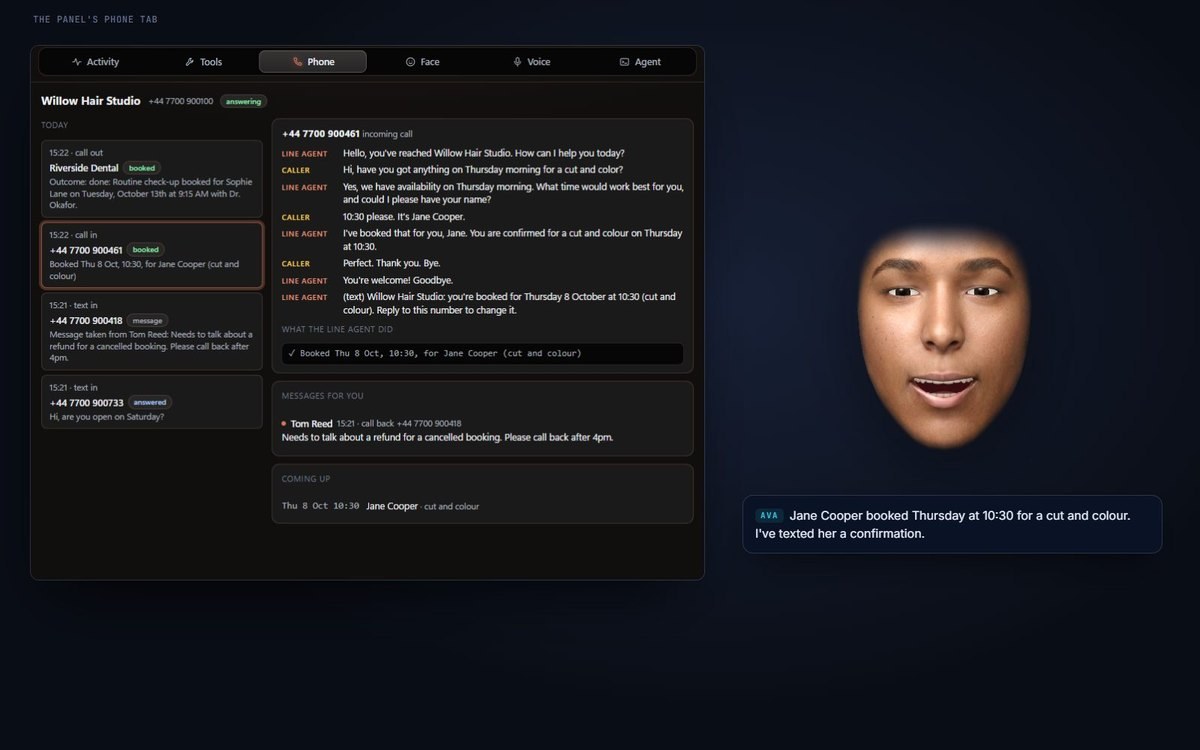
The face tells you as things happen ("Jane Cooper booked Thursday at 10:30"). The panel's Phone tab shows:
- the calls and texts, Today and Earlier;
- each conversation's transcript, live during a call, with What the line agent did, and for a call your agent placed, The goal it was given and its report;
- Messages for you, and the bookings Coming up.
Everything is kept in the face's folder under phone\, with every conversation's transcript.
All the phone settings
Everything above is in the panel. A few more, and the limits behind them, are only in profile.json:
the time between checks for texts, replies a number a day, the longest call, the models, how far ahead bookings go and
how many a caller may make. They're all in the configuration reference.