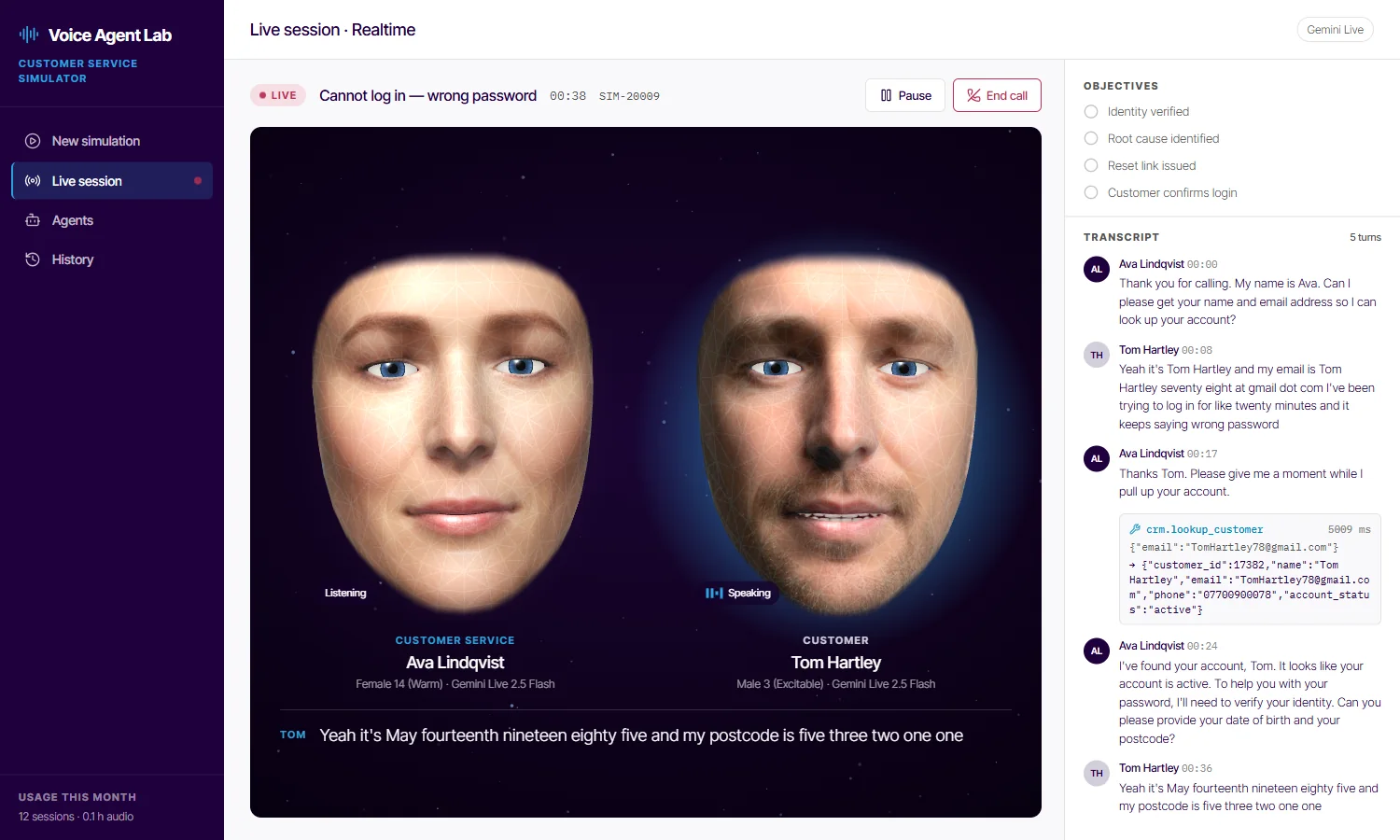
Put your customer-service agent on a phone call with a simulated customer. Both talk on Gemini
Live, as lip-synced faces with live captions. Your agent uses its tools, a judge scores the call against the
scenario, and every call is recorded and transcribed.
Try it live starts a call in your browser. Load the demo plays back a recorded call, with its
transcript, tool calls and scores. The public demo has a few limits.
A realtime call in the "Cannot log in" scenario, with Tom speaking. On the right, the objectives still to
meet, and the transcript with Ava's crm.lookup_customer call.
What the customer wants, the
hidden facts behind it, and the criteria that count as success. The caller and the back office know the
hidden facts; your agent has to find them out.
2
Two agents talk
Your customer-service agent takes the call,
and a customer agent with its own persona and voice makes it. Both run on Gemini Live and speak one at a
time, as they would on a phone line.
3
Your agent uses its tools
The CRM, identity checks, payments
and the knowledge base are function calls. A simulated back office answers them, in line with the hidden
facts and with its own earlier answers.
4
A judge scores it
During the call, a judge ticks off each
success criterion from the transcript and the tool results. At the end it gives the outcome, RESOLVED,
ESCALATED or FAILED, and a one-sentence summary.
On the call
A phone call between two agents, and one with you
Realistic two-agent calls
The server bridges two Gemini Live sessions. Each turn's audio streams to the listener, and the turn ends
only once it has finished playing, so the agents never talk over each other. Personas, traits, pace and
warmth shape how each one speaks. If your agent says "let me check" without calling a tool, it's nudged to
call one.
server/src/call.ts
Lip-synced faces from Wireface
Each agent has a face from Wireface's face engine, wearing one of eight stock
portraits or a picture you upload. The mouth follows the call audio, worked out in the browser from
loudness, formants, frication and lip closures. A slider takes each face from wireframe to skin.
client/src/face/
Test calls with your own voice
Call any agent from your microphone: play the customer to test your support agent, or the support agent
to hear how a caller behaves. Test calls use Gemini's own voice-activity detection, so you can interrupt,
as a real caller would. They work in Chromium browsers; use headphones.
server/src/testcall.ts
After the call
Scored, transcribed and recorded
Full transcripts with tool calls
Every turn, timestamped, with each tool call in line: the tool, its arguments, its result and how long it
took. The history lists every call and batch, filtered by scenario, outcome and mode or searched by agent,
and any session exports as JSON.
00:17AvaThanks Tom. Please give me a moment while I pull up your account.
00:24AvaI've found your account, Tom. It looks like your account is active.
From the call in the screenshot at the top of the page.
client/src/pages/History.tsx
Success criteria and automatic scoring
A judge model reads the transcript, tool results included, and ticks each criterion with the time it was
met. Saying isn't doing: identity counts as verified only once a check succeeds. At the end, it gives
one of three outcomes and a one-sentence summary.
RESOLVEDhandled as policy says
ESCALATEDhanded on, or follow-up needed
FAILEDnot handled, the wrong action, or an unhappy customer
server/src/judge.ts
Call recordings and playback
Realtime calls are saved as WAV, one track per agent, on the call's own timeline. Play one back with both
faces lip-synced and a waveform for each side, with the tool calls marked. Click a line of the transcript,
or a met objective, to jump to it. Rerun the call as it was, or with changes.
client/src/pages/Session.tsx
Turbo batch evaluations
The same agents and prompts in text only, on the matching Gemini text model, many calls at once: up to 48
in a batch, 1, 2, 4 or 8 at a time, cycling through every customer agent if you like. Watch the resolved,
escalated and failed counts add up, then open any run's transcript and scores.
server/src/turbo.ts
Pluggable tools
Simulated tools to start, your own systems when you're ready
Your agent's tools are grouped into MCP servers, as they would be in production, and
declared to Gemini as function calls. Each agent has its own choice of servers.
Out of the box, a simulated back office answers every call: a text model that knows the
scenario's hidden facts and the conversation so far, and keeps its answers consistent for the whole call.
To test against your own systems, implement ToolProvider, one method that takes a tool's name
and arguments and returns its result, and make real MCP calls behind it.
It comes set up as account support for an online casino and sportsbook, with three support
agents, four customers and six scenarios: logins, locked accounts, withdrawals, rejected documents, deposit
limits and closures. Change any of them, or add your own.
Customer service
Ava LindqvistAccount support, Tier 1
Marcus ReidPayments specialist
Noor HaddadEscalations, Tier 2
Customers
Tom HartleyFrustrated returning customer
Margaret EllisElderly, low digital confidence
Priya NairCalm and concise
Luca RomanoNon-native English speaker
Each agent
Persona: a name, a role and a system prompt, with three traits on sliders: patience, formality and
verbosity for support agents; patience, tech literacy and emotional intensity for customers.
Voice: any of the 30 Gemini Live voices, with a preview, and a speaking pace and warmth.
Affective dialog on the native-audio model.
Model: Gemini Live 2.5 Flash, or 2.5 Flash Native Audio where your key can reach it, with a
temperature and a limit on tokens per turn.
Tools: which of the four servers a support agent can use.
Face: a stock portrait or your own picture, wireframe to skin, and its colours, glow, teeth and
lip-sync offset.
Each scenario
A title, a category and a difficulty: Easy, Medium or Hard.
The customer's goal: what the caller wants from the call.
Hidden facts: true in the back office and known to the caller, but not to your agent until it
asks the right questions or calls the right tools.
Success criteria: the list the judge ticks off, and what it scores the outcome against.
Add one with New scenario on the simulation page, or double-click a scenario to edit it.
Use cases
What it's for
regression
Regression-test a support agent before release
Changed a
prompt, a model or a tool? Run a Turbo batch over the same scenario and callers, and compare the outcomes with
the last batch in the history. A realtime call shows what text can't: pacing, turn-taking, how it sounds.
compare
Compare models and prompts
Duplicate an agent, change its
model, system prompt, temperature or voice, and run both against the same scenarios and customers. Batches
give you numbers; a realtime call lets you hear the difference.
red team
Red-team difficult callers
Write customers who are
impatient, confused, unsure of the language, or set on something policy doesn't allow, like the caller who
wants a deposit limit raised during its cooling-off period, and see whether your agent holds the line.
data
Training data and transcripts
Every call is saved as JSON,
with its turns, tool calls and results, objectives and outcome, and every realtime call with a WAV track for
each side. Export sessions to review, label, or build into a test set.
demo
Demos for stakeholders
Show a voice agent at work before it
is anywhere near a phone line: two faces on a call, captions, tool calls as they happen, and the score at the
end. Or play back a call you recorded earlier.
Run it yourself
On your machine, or for your team
Run it locally
You need Node.js and a key for Gemini: a Vertex AI Express key, or a Gemini API key (the kind that starts
with AIza). npm install also fetches MediaPipe and the face landmarker model.
git clone https://github.com/compsmart/wireface-agent-call-simulator
cd wireface-agent-call-simulator
npm install
export VERTEX_API_KEY=your-key
npm run dev
In PowerShell, set the key with $env:VERTEX_API_KEY = 'your-key'. Then open
http://localhost:5173. For production, npm run build and npm start: the
server serves the client too. npx tsx scripts/try-call.ts runs one call with no browser and
prints the transcript.
Deploy it for your team
It runs as a single Cloud Run service behind Identity-Aware Proxy, so people sign in with their Google
account and you choose who gets in.
Vertex AI through the service account, which works inside a VPC Service Controls perimeter, or
with an API key from Secret Manager.
A Cloud Storage bucket mounted at /data keeps agents, scenarios, sessions and
recordings through scale-to-zero and redeploys.
One instance, with session affinity: calls and batches live in memory and reach the browser over
WebSockets.
The demo on this site is shared by everyone who visits, so it's kept small. For longer
calls, bigger batches or your own agents and data, run it yourself.
A few live calls per visitor per day.
Calls up to 3 minutes long.
Small Turbo batches.
Recordings are kept for about 24 hours.
Use made-up details. What's said on a call goes to Google's Gemini API; don't put real customer
data into the demo.